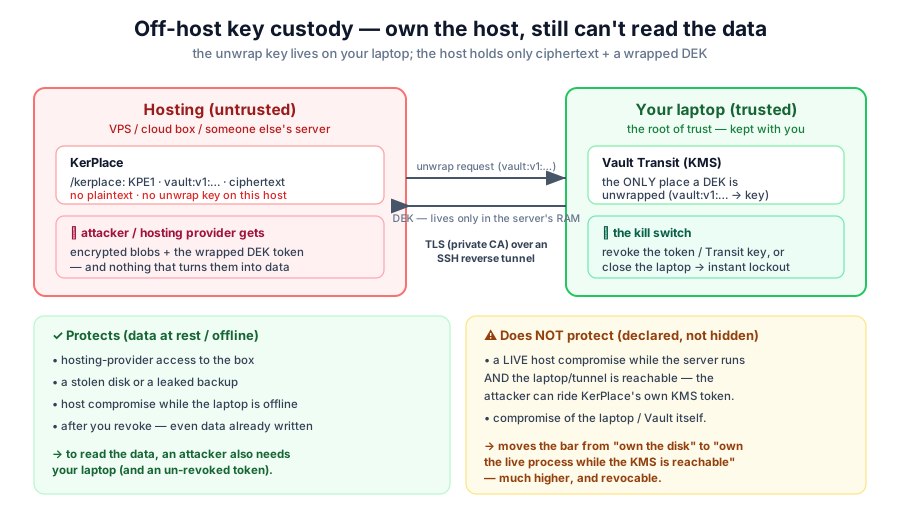
Off-host key custody
Your data on their host, your keys on your device. Compromise the host and you still get nothing but ciphertext.
The idea
Run KerPlace on hosting you do not fully trust — a rented server, a cloud instance, a colocation box — while the key that unlocks the data lives on a device you control, reached by the host over an encrypted tunnel. The host stores only ciphertext and a wrapped data key; the only place that wrapped key can be turned back into a usable key is your device.
What it stops
- A stolen disk or a leaked backup of the host — useless without your key.
- A host compromise while your device is offline — there is no key on the host to steal, and no live channel to the key service.
- Revocation — withdraw the token or rotate the key on your device and the host’s ability to decrypt ends immediately, even mid-run.
How it works
The host runs KerPlace pointed at an external key-management service (KMS) on your device. On every read, KerPlace asks the KMS to unwrap the data key over the tunnel — a network round-trip to your device; the host never holds the unwrapping key. KerPlace is fail-closed: if the KMS is unreachable, it refuses to serve rather than expose data.
Hardened by design
The reference deployment closes the whole channel, not just the keys:
- Nothing on a public port. The S3 data plane rides the same SSH tunnel as the custody link, and KerPlace binds to loopback — the public object-storage port is closed. Zero public S3 surface.
- Post-quantum in transit, by policy. The tunnel’s key exchange is pinned to
ML-KEM (
mlkem768x25519-sha256); a server that can’t offer it is refused, not silently downgraded. The host key is pinned too — no trust-on-first-use. - Unseal material off disk. The key that unlocks the KMS lives on an encrypted USB, decrypted in memory only — never written to the laptop’s or the host’s disk. No USB, no unseal.
- Split backups. Disaster-recovery snapshots come as two separately-encrypted artifacts — the bulk data and the unseal material — so the dangerous part is custodied apart.
Full operator runbook:
deploy/external-kms-laptop/HARDENING.md.
Revocation
From your device, cutting access is instant: revoke the scoped token, rotate the key, or simply drop the tunnel. The buckets go dark until you re-enable access.
The device that holds the key is the root of trust. Keep it persistent, back up the key material separately, and never lose it.
Full detail, source & scripts in the repository → https://github.com/agalletero/kerplace/blob/main/docs/OFFHOST_KMS_CUSTODY.md