Use case: Obsidian on your own terms
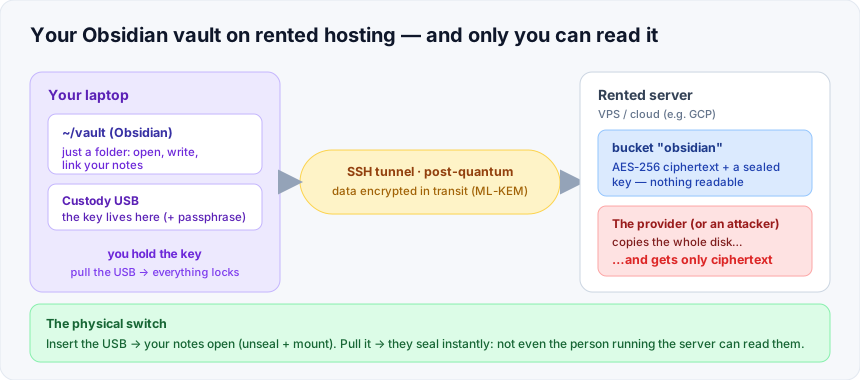
Your Obsidian vault, stored encrypted on rented hosting, with the key on a USB you carry. Pull the USB and your notes lock — for everyone, including the host.
The problem
You want your Obsidian vault — your notes, your second brain — somewhere you can reach from any machine: a rented server, a cheap VPS, a cloud box. But that’s someone else’s computer. Sync services and plain object storage all end the same way: your knowledge sits readable on hardware you don’t control.
What KerPlace does
Your vault stays a normal folder on your laptop (~/vault, opened by Obsidian as
always). Underneath, that folder is a bucket on the rented server — but stored
encrypted at rest, and the key that unlocks it never lives on that server. It
lives on a USB stick you carry, unlocked by a passphrase only you know.
- Work normally. Open, edit, link notes. It’s just files.
- Encrypted end to end. AES-256 at rest on the server; a post-quantum SSH tunnel in transit. The provider — or anyone who steals the disk — sees only ciphertext.
- The USB is the switch. Insert it (+ passphrase) and your notes open. Pull it and they seal instantly — the server loses the ability to decrypt anything, even for the person who runs it. Fail-closed.
One command
A small client, kpc, drives the whole thing — ideal when you (or an admin doing
disaster recovery) just need it to work:
kpc status     # is it sealed? USB present? mounted?
kpc enable     # unseal (USB + passphrase) + mount your vault
kpc disable    # unmount + seal — lock it all down
And it’s tied to the USB itself: insert → your vault comes up; remove → it locks and unmounts. No commands to remember in an emergency.
Why it’s different
You are not trusting the hosting provider with your notes — only with encrypted blobs. You are not trusting the network — the channel is post-quantum or it doesn’t open. And you are not even trusting the server with the keys — they’re on the USB in your pocket. The honest answer to “who can read my Obsidian vault?” is: you.
See the off-host key custody model for the full picture of how the keys stay with you.
Want this for your own vault — or your team’s documents? Email support@kerplace.com.
Full detail, source & scripts in the repository → https://github.com/agalletero/kerplace/blob/main/deploy/external-kms-laptop/OFFHOST_KMS_CUSTODY.md