Basic configuration
Run KerPlace, point any S3 client at it, and create your first encrypted bucket.
Run the server
KerPlace is a single binary configured entirely through KP_* environment variables — no
config file to manage.
KP_ROOT_USER=admin KP_ROOT_PASSWORD=change-me \
KP_DATA_DIR=/srv/kerplace \
KP_ADDRESS=0.0.0.0:9000 \
  kerplace
It also accepts the MinIO-compatible launch form, so existing start commands and scripts keep working as a drop-in.
Point a client at it
Any S3 client works. With the MinIO client (mc), register the server once as an
alias, then use it like a remote drive:
mc alias set mykp http://localhost:9000 admin change-me
mc mb mykp/vault
mc cp ./report.pdf mykp/vault/
The AWS CLI, rclone, s3fs and application SDKs work the same way — point them at the
endpoint with path-style addressing.
Encryption
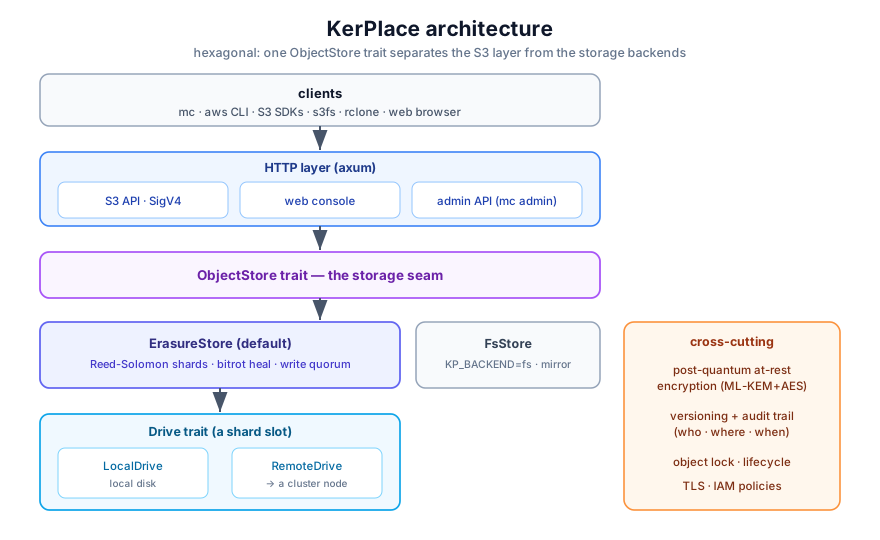
Encryption at rest is on by default: every object is sealed with post-quantum cryptography as it is written. There is nothing to enable. To verify, inspect an object on disk — you will find only ciphertext.
Where the data lives
Objects are stored under KP_DATA_DIR, erasure-coded across drives for durability. Key
material lives separately and can be moved to an external KMS you control (see
Off-host key custody).
Full detail, source & scripts in the repository → https://github.com/agalletero/kerplace/blob/main/INSTALL.md